The two-person rap trend everyone is remaking

Hotel Lobby AI: put you and a friend in the orange booth

Upload two photos, one for the left and one for the right, and get the two of you trading verses at one mic in the burnt-orange studio. Works with friends, partners and siblings.

Example · AI-generated0:15

Allow about 8–15 minutes. This is an estimate; busy periods may take longer. Your task keeps running after you leave.

From $6.99 · no subscription

15-second landscape MP4 (16:9) with the original sound.

  • ✓ Two photos · built-in 15-second clip
  • ✓ Photos deleted after 24 hours
  • ✓ Unofficial, independent tool

Hotel Lobby AI video example
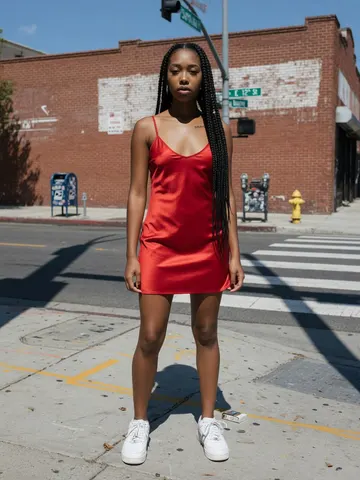
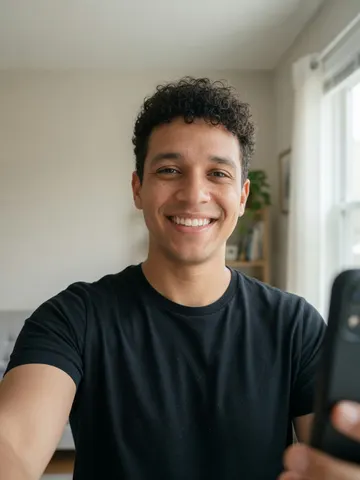
Left photo: a woman in a red dressRight photo: a man in a black T-shirt
Two photos in, one per side: she takes the left mic, he takes the right, and the turn-taking, gestures and laughter stay. A 15-second 16:9 MP4.

What is the Hotel Lobby AI trend?

The Hotel Lobby AI trend recreates the look of Quavo and Takeoff’s 2022 “Hotel Lobby” performance on the COLORS show: two rappers, one hanging microphone and a burnt-orange studio. People use AI to put themselves and a friend in the two spots and post the result as a duo clip.

Our version uses its own orange-studio performance and its own beat, so the two of you trade verses, point at each other and finish the last line together. Add the trending “Hotel Lobby” sound when you post if you want the original song.

How to make the Hotel Lobby AI video

Option 1: Two photos with this generator

  1. Upload a clear, front-facing photo of each person.
  2. Pick a quality (720p Standard or 1080p HD). The Generate button shows the exact credits before you start.
  3. Generate. Allow about 8–15 minutes; you can close the page and find the result in My videos.
  4. Download the MP4 and post it.

Option 2: Seedance or Kling with reference images

Guides such as Kapwing’s use a motion reference from the original performance plus a character sheet per person, then add the song in an editor. It gives more control but takes several tools and attempts.

Option 3: Hotel Lobby AI template apps

Template apps ask for two photos too; many make 5-second vertical clips. Check the length, quality and whether the result keeps both faces stable before paying.

Option 4: Film it yourself

An orange wall, one mic on a stand and a friend: trade bars over the beat and post it with the trending sound.

Hotel Lobby AI prompt

Using a reference-video tool? Upload the original clip as the reference video and your photo as the reference image, then use this prompt. It is the tested prompt behind our generator, rewritten for general use.

Replace both performers with the two people in the reference images. The performer on the left becomes the person in the first image, the performer on the right becomes the person in the second. Keep each person’s face, hair and outfit consistent. Preserve the performance: who raps when, the timing, mouth movements, head nods, hand gestures, pointing and laughter. Keep the burnt-orange studio, the single microphone between them and the locked-off camera. No new people, captions or cuts.

FAQ

Hotel Lobby AI questions

What is the Hotel Lobby AI trend?

+

The Hotel Lobby AI trend recreates the look of Quavo and Takeoff’s 2022 “Hotel Lobby” performance on the COLORS show: two rappers, one hanging microphone and a burnt-orange studio. People use AI to put themselves and a friend in the two spots and post the result as a duo clip.

Do I need two photos?

+

Yes. Upload one photo for the left performer and one for the right. Each photo should show one person (or one pet) with the face clearly visible. Only use photos of people who agreed to be in the video.

Does it use the original Migos song?

+

No. Our clip has its own original beat and vocals. To join the trend’s sound page, pick the “Hotel Lobby” sound in TikTok or Instagram when you post and lower the original audio.

Is the Hotel Lobby AI video generator free?

+

There’s no free tier. This trend costs 100 credits for a 15-second 720p video (130 credits in 1080p), paid with one-time credit packs from $6.99. No subscription, credits are valid for 12 months, and failed videos are refunded automatically.

What photo should I use?

+

A sharp, front-facing photo of each person with the face fully visible, in even light. JPG, PNG or WebP up to 4 MB. Avoid sunglasses, group shots and heavy filters.

Is there a watermark?

+

No. VidStar doesn’t add a watermark or logo; you download a clean MP4 ready to post.

Do I need to download an app?

+

No. VidStar works in the browser on your phone or computer: upload photos from your camera roll, then download the MP4 and post it.

How long does it take?

+

Allow about 8–15 minutes per video; busy periods may take longer. Once your task is confirmed you can close the page and download the result later from My videos.

Does the video include the sound?

+

Yes. The 15-second MP4 keeps the original clip’s audio. When posting on TikTok or Reels you can also pick the trending sound so your video shows up on its sound page.

Can I use my pet or a cartoon character?

+

You can try a clear photo of a pet or your own cartoon or 3D character. Results are less predictable than with human photos, so use one where the whole face or head is visible.

Is this official?

+

No. VidStar is an independent tool. It is not affiliated with, endorsed by or connected to Migos, Quavo, Takeoff, COLORS or their labels.